
IRIS
Immediate translation solutions finder
1 Introduction
What is IRIS?
IRIS is a
text analysis tool that converts terms into hyperlinks to useful information to
understand and translate them in an optimal way.
What is it used for?
IRIS aims
to motivate cosnauts to review difficult medical terms that are frequently
overlooked. Not all terms of intricate understanding and translation are to be
found in a dictionary. Frequently, we underestimate the complexity of similar
words in the source and target languages, or we are unaware of polysemy and
contextual variation. There are many terms that are more difficult than they
seem, terms that are frequently barely understood and badly translated, and
despite this they are listed in Cosnautas resources. How can we know if a
seemingly simple lexical unit, one that we would never normally seek help for,
might pose some difficulty? The solution is very easy: by analysing the source
text with IRIS.
IRIS highlights resource content that would otherwise rarely be found by other
web searches and demonstrates that such searches are not the only means to find
useful lexicographical resources. IRIS alerts against unforeseen difficulty.
How does it work?
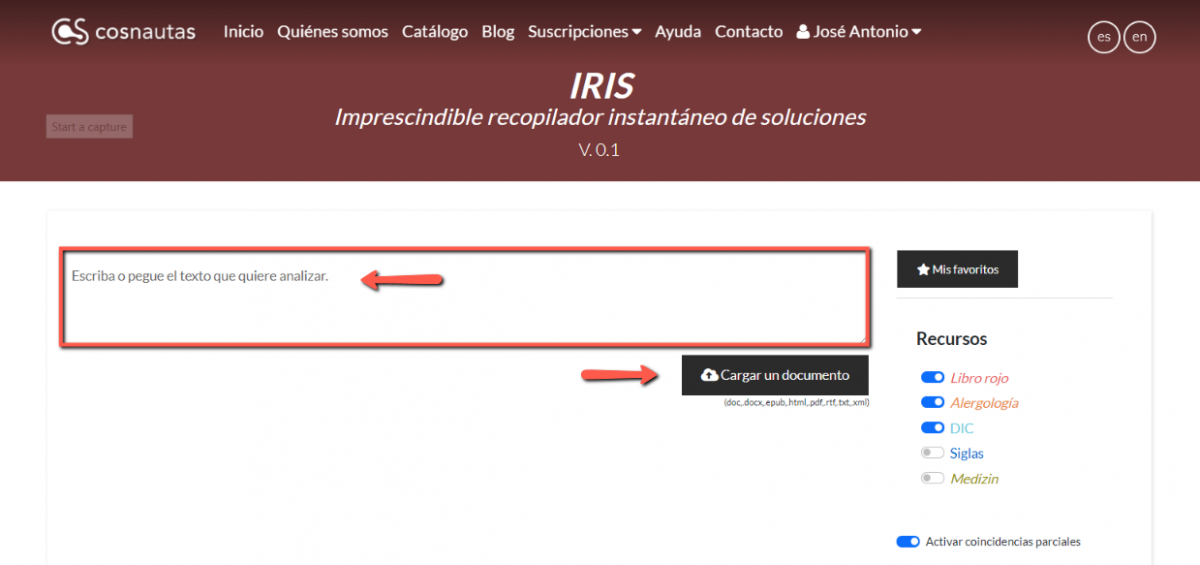
The tool is very simple. The first step consists of sending the text that you want to analyse to IRIS, which can be done in three different ways: writing it directly in the text field, copying it from the source document and pasting it in the field, or uploading a document by clicking on the corresponding button.
IRIS
automatically applies a series of search algorithms and contrasts the text with
corpora from all the selected resources. Next, it highlights all the matches
and inserts hyperlinks to the corresponding related entries.

The user
then simply clicks on any marked term to open a pop-up window showing the
resources that literally list the word, with exact matches highlighted in blue,
as well as other resources that might hold possibly useful information or
partial matches, highlighted in green.
Upon
clicking on any of these terms, a new tab is opened with the article showing
the possible translations.
Secondary functions
- Selecting resources. By default, IRIS is programmed
to work with an English-Spanish language pair, and therefore only the Libro
rojo, the Dictionary of Clinical Research, and Allergology
and Immunology are activated resources. However, users who work with
other language pairs can add or remove resources in the selection setting.
The search algorithms work equally well in German and in Spanish, and in
the future they will also do so with other languages.
- Activating partial matches. IRIS provides two types of
match recognition, one being absolute and always active in compiling the
lexical articles that are literal to the portion of the matched text,
while the other is partial and identifies entries with headings that may
vary within a certain number of characters with respect to the analysed
text. Naturally, this second form of recognition, though usually useful,
often produces false positives, and for that reason it can be deactivated.
- Favourites. IRIS stores all the terms
marked as favourites so that the user may easily return to them.
- Private mode. Using the default
configuration, IRIS gathers statistical information about the most
searched terms and externalizes the conversion of uploaded documents to a specialized
portal that works with numerous formats. However, when private mode is
activated, no statistical information is collected and the document
conversion is made locally in the Cosnautas server, which limits the
available formats but increases the control the user has over the
document.

- Ignoring terms. The tool allows the user to decide which terms they do not want highlighted either because they are already well known or because they have already been researched, thus allowing for a cleaner presentation.
2 History
IRIS originated from the article "Macros and shortcuts for the translator" published in issue 25 of the magazine Panace@ in 2007 by José Luis Heredero, who at that time worked in the translation service at the World Health Organization. In it he described a complete system of very interesting Word macros, among which was AuTerm, a resource developed by Louis Buda and himself. AuTerm automated word searching within a document using multiple terminological databases that were locally stored. The user only had to open the document, adjust the search parameters, start up AuTerm, and, if the text was very long, go and get a coffee. Upon returning, the entire document would be filled with results: for each term found in the databases, AuTerm would add a comment with the corresponding lexicographical information. It was fantastic!
As described in this article, and thanks to the generosity of Fernando Navarro,
one of the databases AuTerm used was the corpus (not the content) of the
already famous Libro rojo, which at that time only existed in hard copy.
The searches with AuTerm in that corpus were a source of constant surprise.
Technical terms were highlighted in the document, which was logical, but there
were also many others that were unexpected in a medical dictionary, such as apparent,
business, officer, positive and even and and for!
What was it about those terms that made Fernando Navarro list them in his
dictionary of doubts and difficulties? It was impossible to resist the
temptation to consult them all in the bright red tome, and thus began an
exciting path of discovery and learning that culminated in a more precise,
finely tuned translation.
3 Acknowledgments
Thank you to Louis Buda and José Luis Heredero–it was the memory of the enormously useful AuTerm macro that inspired the development of IRIS.
To Laura Munoa, for the enthusiasm and contagious eagerness she always showed
in everything related to the project.
To Fernando Navarro, without whose talent and dedication the purpose of IRIS
would have been totally unclear.
To Javier Orellana and Carlos Quintero as well as his team, thank you.